Posts

How to protect your Facebook/Gmail accounts?

Nowadays, every people joined on social media and shares his/her feelings on that platform. But so many people tell that his/her account were hacked. So today I am told you that how you can protect your social media’s accounts. Follow these methods to protect your account. 1. Change passwords regularly. Updating of Facebook/Gmail passwords will help you to protect your accounts. And make your password strong with the help of alphabets, numbers, special characters in your password. 2. Use HTTPs Connection. HTTPs stand for Hyper Text Transfer Protocol Secure. HTTPs connection helps to secure your accounts. Always make sure that you browse in HTTPs. It will always secure you. 3. Link verified mobile number in your account. If you want to protect your account so you must link your account with verified mobile number. When someone tries to login in your account without your permission it will send a message about login access and it also helps to recover your account. ...
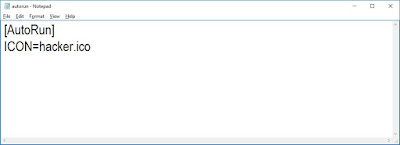
How to set a custom icon in drives, removable drives or CD\DVDs.

Image
Hello everyone, today I am explain you an another computer trick. When we open any CD\DVD we saw an icon is appearing. The icon is related to the data is stored in the CD\DVD. So today I am explain you that how we can set an icon in our drives, any removable drives or CD\DVDs. Now let’s start - Step I: Open notepad. Step II: Now type the following code:-              [AutoRun]              ICON=hacker.ico And now save it in the drive (in which you want to set the icon) with the extension .inf like- ‘autorun.inf’ “ ICON=hacker.ico  is represent the location of icon file, hacker.ico is the name of icon file” (Note: In this code the location of icon file is the drive location which you were want to set the icon so the icon file must be save in the same drive) Step III: After completing the above steps follow this, if you trying to set the icon in your...

How to create a welcome note in windows.

Image
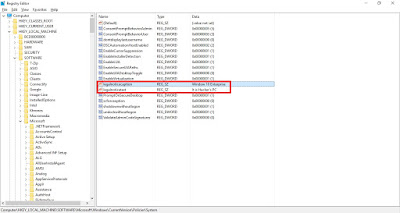
Hello everyone, today I am explain you that how we can write a welcome note in windows. We all are know that earlier mobile phones have in built feature of writing welcome note but in windows nobody use to write welcome note because of many reasons many people are not know about how to write a welcome note. So now I am explain you how we can write a welcome note. Step I: First open Registry Editor. (NOTE: To open Registry Editor open Run to open Run window press WINDOW+R key or simply search Run) Step II: Type regedit in Run window and click on Ok option. From regedit command Registry Editor will open. Step III: In Registry Editor Click on HKEY_LOCAL_MACHINE then SOFTWARE then Microsoft then Windows then CurrentVersion then Policies then System like this- HKEY_LOCAL_MACHINE\SOFTWARE\Microsoft\Windows\CurrentVersion\Policies\System In right side pane many options are there open legalnoticecaption option and type the welcome note heading (Which you want to display ...

How to change PC password without knowing old password.

Image
Hello everyone, today I am told you that how we can change PC password without knowing its old password. Nowadays everyone is password protected. Every person who uses gadgets, internet, etc. creates many passwords to protect himself. But nowadays everything is possible. So friends lets we start to learn how to change PC password without knowing its old password. We have two methods to change PC password. So lets we start step-by-step. First Method 1. First go to My Computer Icon and right click on it and click Manage option. 2. After this, Computer Management window will open. In this choose Local Users and Groups option after choosing this option two options will appear first one is Users and second is Groups so click on Users option. 3. After choosing Users option, list of all users account will appear which were created earlier in PC by the user. Right Click on any user name which you will want to change the password. And choose Set Password option. 4. After c...